In traditional plugins
The article stands alone
You enter a keyword and the tool tries to produce the best possible page for that one query.
keywordhealth plan denied my surgery
and writes 1 article about that query.
60 days freeAPC Editorial · your AI editor-in-chief in WordPress
APC Editorial plans the clustering of your topics, focused on a topical authority strategy. It reads the competition on Google, writes the article, fills in the SEO, creates the image and publishes on a schedule, with ongoing upkeep of the content. Built for agencies, law firms, clinics and newsrooms.
About APC Editorial
Instead of starting from isolated keywords to produce standalone articles, APC Editorial starts from a core subject you choose and clusters it: the subject turns automatically into a structured editorial plan, with a pillar and the topic clusters around it.
The plan organizes pillar pages, clusters, subtopics, search intents, funnel stages, priorities and publishing order. It is your site's editorial article strategy: it prevents overlap and cannibalization, links your content together and guides the steady growth of your topical coverage.
How it works
The first setup takes time: the account, the AI keys and each plan's settings. That detail is what keeps every article up to your site's standard. After that, for each topic, you review the brief, the plugin writes the article with AI and you decide what to publish.
1
Youonce
Sign in with your jode.io account and save the keys of the AIs you will use. The keys are yours: each article's cost is billed straight to your own account with each AI.
2
Youper plan
Each plan has its own settings. 3 are required before generating: the editorial prompt (target audience, main profile and publishing entity), the category and the author.
3
You + AIper plan
Generate topics with AI, import your spreadsheet or type the titles. No topic enters the plan without a brief compared against every other topic.
Generate themesImport themesInsert manually
4
Youper topic
The brief says what the article covers and what is left to neighboring topics. You check and fix it before generating.
Main Keyworddismissal for job abandonment
IntentInformational
FunnelTop
Micro-questionWhen does an employee's absence become job abandonment?
Anti-cannibalization noteAngle: when absence becomes abandonment · Not covered: «Constructive dismissal: the complete guide»
5
APCper topic
APC reads who already ranks, compares it with what your site has already published and writes the full article, with SEO, image and LinkedIn summary.
6live
You decideper article
Publish now, schedule it or send the draft for your client to approve. Then track each article's impressions, clicks and ranking.
Impressions
Before1,240Now3,980
▲ 221%
Clicks
Before18Now74
▲ 311%
Average position
Before14.2Now6.8
Improved
Rank Tracking
Mobile3rdDesktop4th
DataForSEO
2 workflows
The traditional workflow ends when the article goes live. APC Editorial's keeps going until it builds topical authority.
Traditional tools: start at the keyword and end at publishing.
APC Editorial: starts at the subject and ends in topical authority.
Both write the article, but APC gets there with the strategy already in place.
What sets it apart
In traditional plugins
You enter a keyword and the tool tries to produce the best possible page for that one query.
keywordhealth plan denied my surgery
and writes 1 article about that query.
In APC Editorial
The article comes from an editorial article strategy: before writing, APC decides where each piece belongs in the cluster.
What does the subject need?
How do the topics fit together?
What comes first?
What could go wrong?
APC doesn't build an editorial plan because it found keywords. It uses keywords to validate and refine an editorial plan built around a subject.
A practical example
A keyword tool receives
"health plan denied my surgery"
and writes 1 article about that query.
APC maps the subject's editorial universe
Health insurance claim denials
Then it organizes
A far broader job than writing one article for one keyword.
What you get
Each level builds on the one before. The article only shows up in the 4th.
Reads your chosen subject and maps its universe: entities, problems, questions, intents and subdivisions.
Organizes that universe into pillar pages, clusters, subclusters and supporting content.
Sets priorities, production order, categories, tags, internal relationships and the publishing schedule.
Writes the articles, publishes them, builds internal links and updates the structure as the plan moves forward.
That sequence is much closer to an editorial article strategy than to a writing assistant.
From starting point to article
Fourteen points that separate an article generator from an editorial system, and how APC Editorial handles each one.
| Strategic dimension | What to check | How APC Editorial does it |
|---|---|---|
| Starting point | Keyword, subject, URL or brief | A subject and a brief; keywords validate the plan |
| Editorial plan generation | Whether it creates loose ideas or a structured plan | A structured plan with pillars, satellites, funnel and intent |
| Topical authority | Whether it builds coverage of a subject over time | New topics read the whole plan and earlier seasons |
| Cluster architecture | Whether it defines pillars, satellites and subclusters | Pillar, Satellite and Subsatellite in every cluster |
| Topic hierarchy | Whether it sets dependencies and priorities | Each brief says what it covers in depth and what it leaves to its neighbours |
| Search intent | Whether it tells intents apart within one subject | Informational, commercial-investigative or transactional, with the funnel stage |
| Cannibalization prevention | Whether it spots overlap before writing | A repeat check when generating topics and anti-cannibalization before every article |
| Publishing order | Whether it decides what comes first | Plan order drives the queue and the schedule |
| Internal links | Whether it plans and builds links between pages | Native and AI link building, always leading to the pillar |
| Pillar upkeep | Whether it updates indexes, hubs or pillar pages | The article index refreshes on every publish, and pillars are strengthened with Search Console queries |
| Publishing schedule | Whether it turns strategy into an operating schedule | Daily, weekly or monthly scheduling with an approval queue |
| Execution in WordPress | Whether it turns the plan straight into posts and tasks | Creates posts with SEO, category, author, image and custom fields |
| Keeping authority | Whether it tracks gaps and how coverage evolves | Search Console, rank tracking and new-topic opportunities |
| Article writing | Whether it also produces what was planned | Yes, as one step of the plan, never as the end goal |
Editorial intelligence
Most AI plugins write articles from the demand behind a single keyword. APC Editorial works keywords inside an editorial plan, and that is what brings topical authority gains on Google and in AI answers.
Most plugins
APC Editorial
Be honest with yourself
If all you want is a plugin that automates articles, with no plan and no editorial intelligence, APC Editorial is not for you. You are in the wrong place.
It is for people who want to run campaigns with editorial intelligence, in a smart, automated flow, and earn topical authority. It goes far beyond simple article automation.
Who it's for
Every client in one place, with unlimited projects, client approval and the cost of each article so you bill it right.
A strict legal profile, rulings looked up on court websites and LinkedIn posts with the closing statement the sector requires.
Articles that never promise results, never invent credentials and only cite official sources anyone can check.
Many beats, dozens of authors and daily scheduling, with an approval queue and a history of every change.
Steady content without hiring a newsroom, with each author's LinkedIn fed alongside the blog.
Plan, competitors, Search Console, rank tracking and backlinks in one place, inside your client's WordPress.
Case studies
A law firm and a physician. Figures from each site's own Google Search Console and rank tracking, counting only articles generated with AI in APC Editorial.
Law hmgcadvogados.com.br
A corporate law firm in São Paulo. Since July 2026, 24 blog articles were born in APC, in season plans on M&A, hiring models and working hours.
Measured on Oct 28, 2026 · Search Console through Oct 26 · positions from the client's DataForSEO
Featured article
Declarações e Garantias em M&A: Como Negociar e Se Proteger

 3ºon Google · Oct 28, 2026
In the APC Editorial dashboard
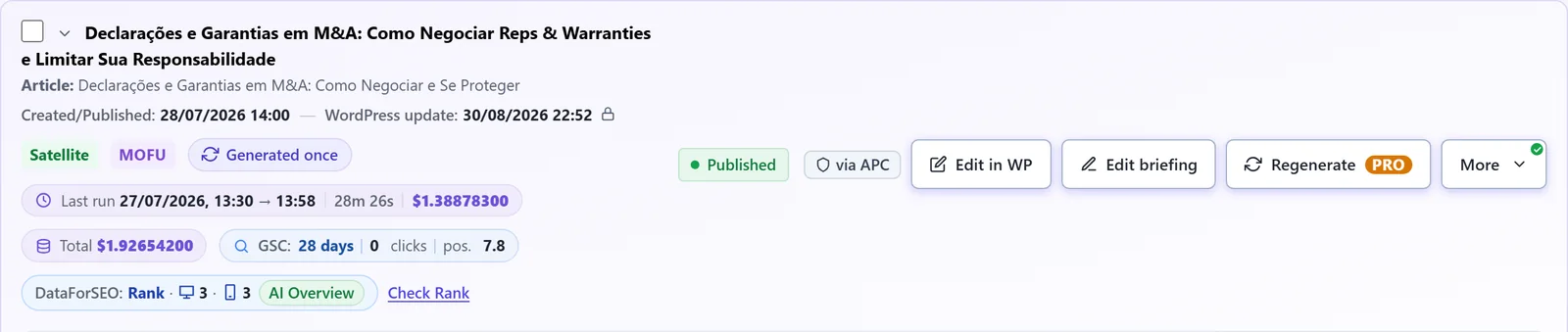
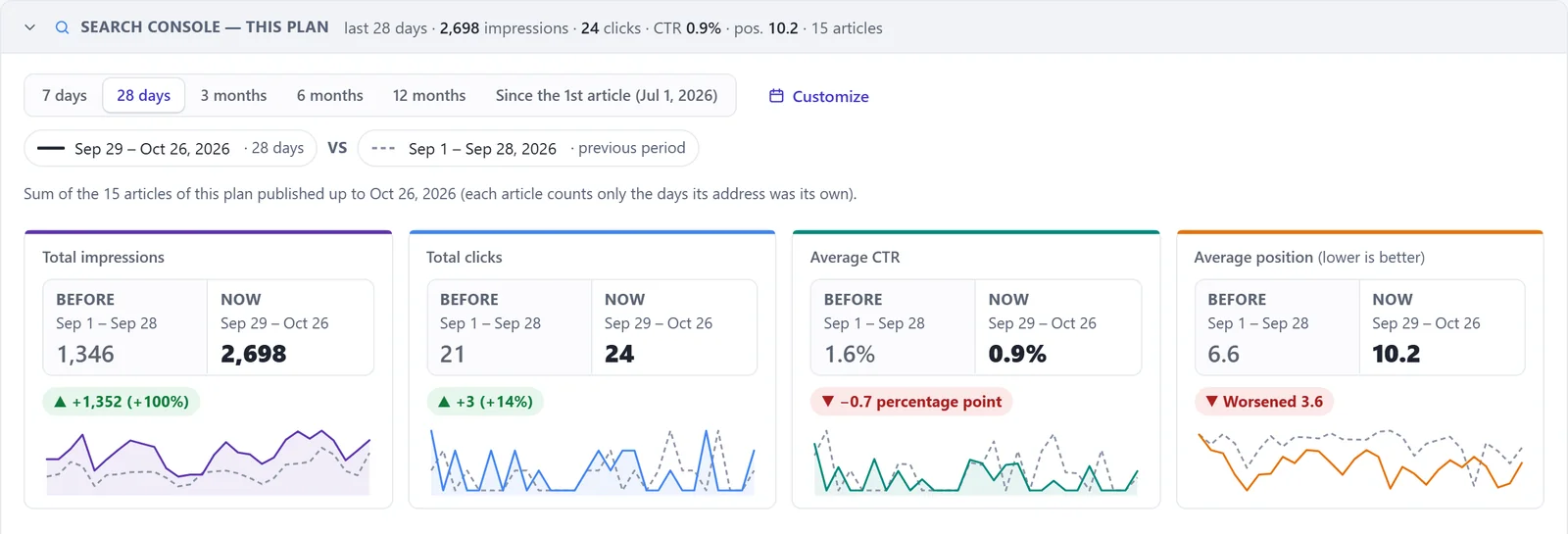
Sources. Impressions and clicks: the site's own Google Search Console, whole site, the 28 days before the first article born in APC (Jun 13 to Jul 10, 2026) × the last 28 days (Sep 29 to Oct 26, 2026). Positions and AI Overview / AI Mode citations: APC Editorial's Rank Tracking, measured through the DataForSEO API with the client's own account, on the Oct 28, 2026 check, articles born in APC only. A site's results also depend on other factors.
Healthcare anabuhler.com.br
A physician specialized in blepharoplasty, with practices in 4 cities around São Paulo. Her blog started from scratch with APC in August 2026.
Measured on Oct 26, 2026 · Search Console through Oct 26 · positions from the client's DataForSEO
Featured article
Blefaroplastia depois dos 60 anos: é seguro?

 1ºon Google · Oct 26, 2026
In the APC Editorial dashboard

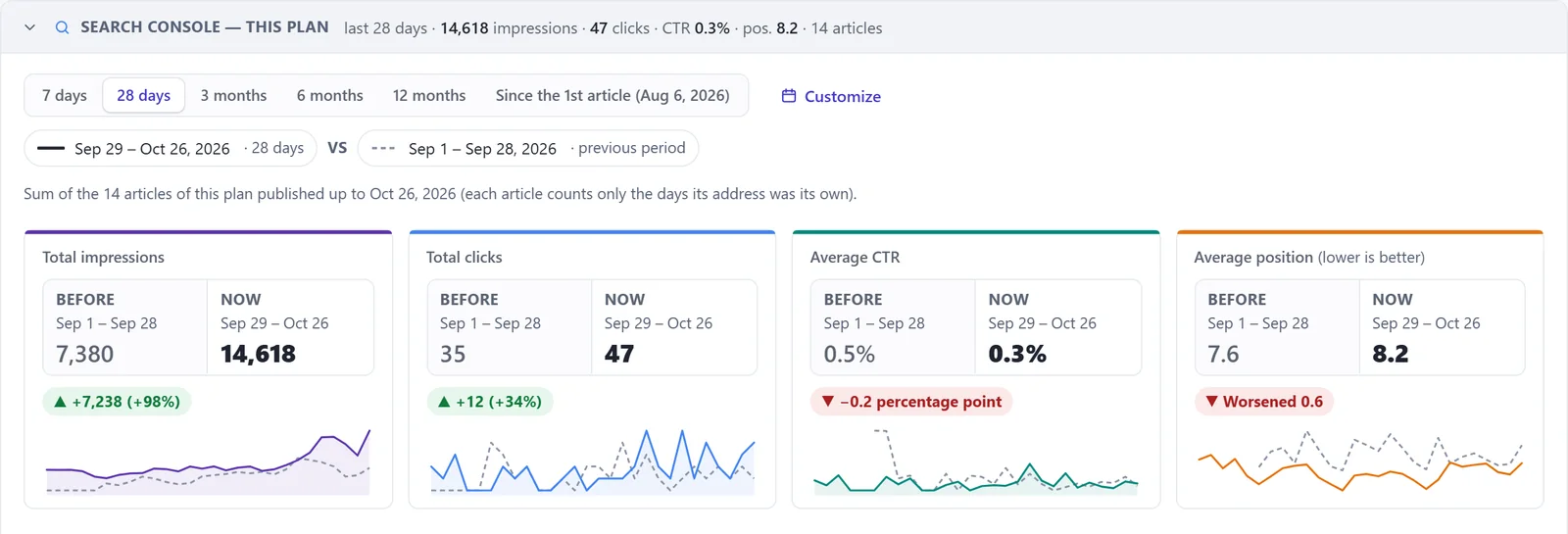
Sources. Impressions: the site's own Google Search Console, first 14 days with data (Sep 6 to 19, 2026) × last 14 days (Oct 13 to 26, 2026). Positions and AI Overview / AI Mode citations: APC Editorial's Rank Tracking, measured through the DataForSEO API with the client's own account, on the Oct 26, 2026 check. A site's results also depend on other factors.
Features
From planning to measurement, without switching tools. Items marked FREE stay free forever; the rest are PRO and fully unlocked during your 60 free days.
Your blog strategy, organized.
Organize clients, sites and sections in a tree with as many levels as you need.
Each plan has its own topics, authors, categories and settings.
Paste one title per line. Each topic joins the plan with its brief already written by AI.
Download the full plan to present to your client.
Builds the plan from a brief, with pillars, satellites, funnel stage and search intent.
Every new topic is checked against the topics and articles you already have before it joins the plan.
Bring the plan you already have and choose which column becomes each field. Every topic arrives with a brief.
Keyword, micro-question and scope: what the article covers in depth and what it leaves to neighbouring topics.
A live list of what the site has published, which the plan checks so topics never repeat.
Standalone posts with topic, brief and image, kept apart from your blog plans.
Research before writing. Always.
Reads the pages that show up on Google, in AI Overviews and in AI Mode for your keyword.
Shows what competitors leave out and how your article goes further, without inventing experience.
Every new article is checked against what the site already has, so it never competes for the same search.
Real cases with verified links. For Brazilian law, rulings looked up on court websites.
The FAQ answers what people ask in "People also ask".
The main keyword always in the excerpt and first paragraph, checked before publishing.
Legal, Health and Finance profiles stay in their field and never promise results.
Articles cite primary sources readers can verify.
Text, SEO fields and even the text in images come out in the language you choose.
Text is never cut to save money. If the model stops midway, it picks up where it left off.
Every field in its place.
SEO title, meta description and keyword filled in the SEO plugin you already use.
Inherited from the plan or chosen per topic. The plugin never creates categories on its own.
Send the first paragraph, a CTA or fixed text to your theme's fields.
Insert forms or calls to action after the paragraph you choose.
Changed the URL? The redirect is created in your redirect plugin, with no chains or loops.
Notifies Bing and other search engines of every published article, skipping noindex content.
Schema Rank author and related topics filled in along with the article.
LiteSpeed, WP Rocket, W3TC, Breeze, Super Cache and Cloudflare purged when something changes.
Nothing goes live without your say.
Daily, weekly or monthly, up to 20 time slots, in your site's time zone.
You choose on every run. Draft is the default.
The new version waits alongside and only replaces the old one when you publish, at the same URL.
An approval panel with its own access, in-text corrections and publishing on approval.
Approved articles go live one per time slot, in plan order.
Your client gets the link and the article as a Word file, with the SEO data.
Article, SEO data and LinkedIn post as .docx, any time.
Who created, published and changed each article, and where the change was made.
Every article becomes a post too.
A large-image post with the article link, on the writer's profile.
Each author connects their own profile once.
Legal, health and finance posts never go out without the sector's closing statement.
The preview shows exactly what will go out, with the full image.
Created in the format LinkedIn accepts and saved so you can review it first.
The summary travels with the article: approve one and you approve both.
Good-looking, light and with alt text.
With your logo and color palette, at the size you set.
For the featured image and any image in your media library.
Create images right in the editor's media window.
Lighter images across the whole site, with the original kept.
Converts images that live outside the media library.
Undoes the conversion and fixes every address before deleting any file.
Finds copies by how they look and swaps every use before deleting.
List images without alt text and fill it in right on the list.
Renames the image and redirects the old address.
Rebuilds the image sizes your theme uses.
Every article pointing to the right place.
The anchors the writer creates become links to the right topics in your plan.
Suggests and inserts links between articles, always leading to the topic's pillar.
Changed an article's URL? Internal links start pointing to the new one.
A block at the end of each article takes readers to your service page.
Finds 404 links and removes only the link, keeping the text.
Clears old internal links in bulk, without touching external ones.
Every article's results, in plain sight.
Impressions, clicks, CTR and position for the whole site, Before | Now.
Impressions, clicks, CTR and position, Before | Now, per article, plan and project.
Checks whether each new article is indexed and tells you why when it isn't.
Articles worth strengthening and real searches that become new topics.
Keyword position on mobile and desktop, and whether your site is cited in AI Overviews and AI Mode.
Authority and the best backlinks of the pages you compete with on Google.
How many are good and how many are bad, with the full list.
Where each lead came from, and the report with your brand, as PDF and by e-mail.
Each step with its own cost, per article, plan and project.
Pause the queue or get an alert when spending hits your limit.
Your key, your cost
Text uses your Anthropic (Claude) key and images use your OpenAI key. The charge goes to your account with them, with no markup from us.
jode.io only uses your key during each run and never keeps a copy.
Every article shows what each step cost. Billing clients and picking a model gets easy.
The spending cap pauses the queue. It never shortens the text or swaps in a weaker model.
Illustrative figures. Real cost varies with the model and article length.
Privacy
Only what's needed, always with your permission. Full details in our Privacy Policy.
You access the plugin with your Google account. We receive your name, email and account ID only to recognize your jode.io account, your plan and your connected sites.
Only when you click "Connect Search Console" do we ask for read-only access to your sites' performance data. Nothing in your Search Console is changed.
Pricing
Install the plugin, sign in with your jode.io account and use everything for 60 days. Then stay on Free with no time limit, or subscribe to PRO.
per user, on unlimited sites
or US$ 200.59 per year
jode.io community
Leave your contact details and get the plugin, an invite to the community group and news before anyone else.
Support: support@jode.io
Others start from a loose keyword and write a standalone article. APC Editorial builds an editorial article strategy: it clusters the subject into an editorial plan, checks what your site has already published, reads the competition on Google and only then writes each article, with internal links to the pillar.
Each article comes with the keyword in the first paragraph and the excerpt, title and meta description in your SEO plugin, category, tags, an image with alt text and internal links. Before writing, APC compares the topic with competitors and with what your site already has, so it doesn't cannibalize.
Yes. You schedule generation daily, weekly or monthly, and the plugin writes up to 5 articles at a time per site, in the plan's order. Each one can go live right away, be scheduled or wait as a draft for review.
The cost is the AI's, billed straight to your Anthropic and OpenAI accounts with no markup from us. The sample receipt on this page shows US$ 0.36 for a full article with an image; the real figure depends on the model and the length. The plugin shows the cost of each step and you set a spending cap.
Yes. Text uses your Anthropic (Claude) key and images use your OpenAI key. Perplexity and DataForSEO are optional and improve case research, competitor research and rank tracking.
Your choice: stay on Free with no time limit, or subscribe to PRO for US$ 19.90 a month or US$ 200.59 a year, per user, on unlimited sites. Your plans, topics and articles stay on your site.
As many as you like, on Free and PRO. One jode.io account covers all your sites.
Only if you choose "Publish". Draft is the default, and you can send the article to your client for approval first.
Yes. It works on Elementor sites and fills in Yoast SEO, Rank Math, All in One SEO and SEOPress.
In whatever language you set. The plugin's dashboard is in English and Portuguese.
No. Your keys stay in your WordPress and are only used during each run. The finished article goes to your site.